
Accurate project status reporting is critical for successful project management. Sponsors and stakeholders need reliable updates to make informed decisions and avoid costly surprises. Recent research highlights the challenge: according to Wellingtone’s 2025 State of Project Management report, 42% of professionals spend at least a day manually collating project reports, and 72% believe the scope and responsibilities of their PMO will grow. Meanwhile, PMI’s Project Success survey found that only 7% of project professionals consistently apply a comprehensive success framework.
These figures underscore the significant room for improvement. How can a PMO implement a simple yet effective system to communicate project health and guide corrective action?
This blog post explores PMO RAG status levels—Red, Amber, and Green—and offers practical advice for defining, applying, and refining them within your PMO.
Understanding PMO RAG Status Levels
RAG status levels are a straightforward yet powerful way to communicate project health. The traffic‑light colours represent different levels of risk and progress:
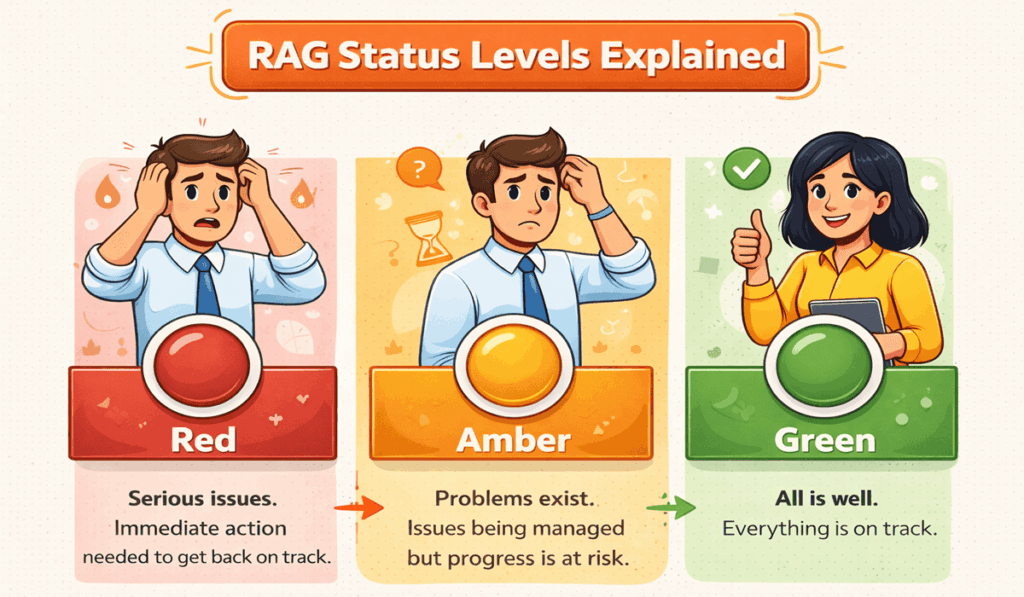
Definitions of each color vary slightly by organisation, but the basic principles remain consistent. Red projects are in critical condition and require urgent corrective action; amber projects have emerging issues that require close monitoring and proactive management; and green projects are on track and within reasonable bounds.
The traffic‑light metaphor helps stakeholders quickly grasp where attention is needed.
The Importance of Consistent RAG Definitions
For RAG status reporting to be effective, the criteria must be clear and consistent. Without agreed definitions, one project manager’s “amber” may be another’s “red.” Establishing objective thresholds removes ambiguity and builds trust.
Each organization should set specific metrics for key areas such as:
- Schedule Delays: Define the percentage over baseline that triggers amber or red. For example, more than 10% late might signal amber, while more than 20% triggers red.
- Budget Overruns: Decide what variance is acceptable. Staying within 5% of the budget could remain green; a 5%–10% overrun might turn amber; more than 10% could be red.
- Scope Changes: Determine how much deviation from the scope baseline is tolerated before amber or red status is applied.
- Benefits Realization: Set thresholds for delays or deviations in expected benefits. If benefits slip by more than 15%, you might label the status amber; if the benefits are unlikely to be realised, red may be appropriate.
- Resource Constraints: Consider resourcing levels when assigning status. Severe resource shortages could warrant red even if other metrics are on track.
When defining these thresholds, involve sponsors, team members, and stakeholders so everyone interprets the colours consistently. Document the definitions in your PMO handbook or project management tool and revisit them periodically. This collaborative approach gets stakeholder buy‑in and ensures the system remains relevant as your organization matures.
Implementing RAG Status in Your PMO
Define criteria and embed them
Start by establishing baseline criteria for each colour across the main project dimensions: scope, schedule, cost, benefits, and overall status. Use a table to set measurable thresholds. For example, you might specify that missing a milestone by one week is amber and by more than two weeks is red. For cost, define the percentage variance that prompts escalation.
Example Thresholds:
| Area | Green | Amber | Red |
| Schedule | All milestones are on or within 5% of the plan | Delayed by up to 10% of the plan | Delayed more than 10% of the plan |
| Budget | Within ±5% of baseline | Overrun between 5%–10% | Overrun greater than 10% |
| Scope | Changes within agreed tolerance | Significant change requiring approval | Major deviation jeopardizing objectives |
| Benefits | Benefits are on track or early | Delay of benefits realization up to 15% | Benefits unlikely to be realized without change |
| Resources | Resources meet demand | Minor shortages are manageable with adjustments | Severe shortages are compromising delivery |
Tailor the thresholds to your organisation’s tolerance and maturity. A small startup may accept higher variance, while a regulated environment may adopt stricter thresholds. Make sure the criteria are simple enough to apply consistently but detailed enough to capture nuance.
Document and communicate
Once agreed, document the RAG definitions in a central location. Create a short guide summarising the thresholds, and host it on your PMO intranet or knowledge base. Brief project managers on the definitions and provide examples of how to apply them. Encourage managers to ask questions and share feedback to refine the criteria. This communication phase is critical—without it, definitions may be misinterpreted or ignored.
Monitor and review
The PMO should review project reports regularly to ensure that RAG statuses reflect reality and that definitions are applied consistently. During reviews, check whether projects with similar performance metrics share the same status. If not, revisit the criteria or provide coaching.
Over time, you may identify trends—for example, if many projects stay amber for months, the thresholds may be too generous, or teams may be hesitant to report issues. Adjust thresholds, provide additional training, or create escalation mechanisms to improve accuracy.
Automating part of the reporting process can ease the burden on project managers. Templates and dashboards that calculate RAG status based on key indicators reduce manual effort. The Wellingtone research indicates that 42% of respondents spend one or more days compiling reports; automation can free up time for analysis rather than data gathering.
Advanced RAG Techniques
Once your organisation masters basic RAG status reporting, consider adding nuance. One approach is to introduce sub‑levels, such as Green 1, Amber 2, Amber 3, or Red 4, Red 5. This granularity helps indicate whether a project is improving or deteriorating. For example, a project might be “Amber 2” because it has slipped slightly; if its situation worsens, it could become “Amber 3.” Sub‑levels provide stakeholders with a more precise view of risk without adding undue complexity.
Another technique is to pair each colour with a trend arrow. An upward arrow indicates improving status, a downward arrow indicates deterioration, and a sideways arrow indicates stability. These visual cues help decision‑makers focus on issues requiring attention. If a project remains amber but shows a downward trend, it may warrant escalation even if thresholds have not yet been crossed.
When introducing advanced techniques, always provide clear definitions and training. Complex scales can confuse stakeholders if not understood. Start with a pilot group and gather feedback before rolling out organisation‑wide.
Common Pitfalls and How to Avoid Them
The simplicity of RAG reporting can mask potential pitfalls. Here are some common issues and ways to address them:
- Staying Amber Indefinitely: Projects sometimes stay amber for months without moving to green or red. Avoid this by setting clear timelines for resolution. If issues persist beyond a defined period, automatically move the status to red.
- Subjective Judgments: Without clear criteria, project managers may choose colours based on personal perception. Document objective thresholds and provide examples to reduce subjectivity.
- Gaming the System: Teams may keep projects green to avoid scrutiny. Encourage a culture of honesty and learning. Remind teams that reporting problems early allows for timely support.
- Lack of Follow‑Up: Reporting status is only valuable if action follows. Establish corrective action plans for amber and red projects. Define who is responsible and when updates are due.
- Overcomplication: While advanced techniques add nuance, too many levels can confuse stakeholders. Introduce complexity gradually and only if it adds value.
A Brief Case Example
Imagine a software development project scheduled to deliver a new customer portal by September. At the start, the team assigns a Green status across all dimensions because milestones are being met and costs are within budget. Two months in, a key developer resigns, and scope creep begins to emerge. The project manager re‑evaluates the thresholds: the schedule is slipping by 8%, budget variance remains within 5%, but scope changes are increasing. Based on the agreed criteria, the status changes to Amber for scope, while the schedule remains Green.
The PMO reviews the report and flags it as amber. An action plan is triggered: the team re‑prioritises features, hires a contractor, and updates stakeholders. Over the next month, scope variance stabilizes, and the project returns to Green. By monitoring thresholds and acting quickly, the team avoids a more serious delay. If no action had been taken, the project might have moved to Red, requiring a recovery plan. This case illustrates how clear RAG definitions and timely interventions can keep projects on track.
FAQs
Q1. What is a RAG status?
RAG stands for Red, Amber, and Green. It is a colour‑coded system used in project management to communicate whether a project is on track (green), facing issues (amber), or in serious trouble (red).
Q2. Why does my PMO need consistent RAG definitions?
Consistent definitions remove guesswork. When everyone uses the same thresholds for time, cost, and scope, stakeholders trust the reports and can compare projects fairly.
Q3. How do I set thresholds for each color?
Define measurable limits for schedule, budget, scope, and benefits. For example, a 5%–10% budget overrun could be amber; more than 10% might be red. Tailor thresholds to your organisation.
Q4. What happens if a project stays amber for too long?
If issues aren’t resolved within the agreed timeframe, the project should move to red status. This captures senior attention and ensures problems are addressed rather than linger.
Conclusion
RAG status reporting is one of the simplest and most effective tools for monitoring project health. By defining clear criteria, documenting and communicating them, and regularly reviewing status, PMOs can ensure consistency and trust. Introducing advanced techniques, such as sub‑levels and trend arrows, adds nuance without sacrificing clarity. However, the colours themselves are not enough—organisations must follow through with action plans, empower project managers to own success, and continually reassess their frameworks.
With good practices and a commitment to transparency, RAG status levels can help your PMO deliver projects that meet objectives, control risks, and provide lasting value.